The modern photographer faces many challenges managing a massive volume of ephemeral images, in a day-to-day workflow. Captured images must be stored securely, and used freely, for a multitude of different applications, in physical, and virtual environments. There is no one single way to proceed, and insure success in a complex process that is unique for each individual artist. This collection of video tutorials offers only one photographers perspective, but hopefully I can provide some insights to help you craft your own imaging workflow, to meet your specific needs.
This is a Lightroom centric workflow, but by no means a Lightroom exclusive workflow. Many photographers utilize Bridge to great success as a hub for a workflow that encompasses many more creative applications than Photoshop, and Lightroom—but most photographers are very content to use Lightroom as their main creative application. That does not mean that the modern photographer can get away with only using Lightroom—images are ubiquitous across the internet, and modern workflows must encompass Instagram, Facebook, Flickr, and numerous other web-based applications, as well as printed output in various forms. In addition, digital image files require special care to preserve the vulnerable 1's and 0's using other software applications, and different hardware platforms—a complete workflow has to address a very complex set of requirements.
The course is organized into 5 main categories: Capture, Input, Organization, Output, Backup... We will explore:
- Capture hardware and software
- Camera cards
- Raw files, jpegs
- Tethering, and image review
- Temporary storage on location
- Importing images
- Card readers
- hard drives & image locations
- Catalogs and Archives
- Folder Structures
- Metadata
- Key Words
- Exporting Images
- File Formats & File sizes
- Web Galleries
- Publishing Workflows
- Printing, Lightroom, Photoshop, and Rips
- Backup and Retrieval
- Archives vs Backups
- Hard Drives & Raids
- Cloud Storage
- Optical & other long-term storage solutions
- Outside resources are referenced throughout the course, and links to various hardware and software solutions are provided in each section for your convenience. To a certain extent, this course is a work-in-progress, which is constantly evolving to adapt to changes in the imaging landscape. Your questions and comments are welcome!
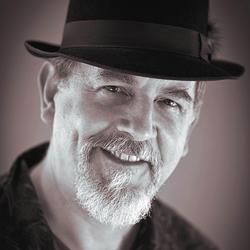
Your Instructor
Lee Varis
Lee Varis is a photo-illustrator now working in the Boston area. He has been involved in commercial photography for the last 35 years. He started working with computer imaging about 23 years ago and currently works with digital as well as conventional photography in conjunction with computer graphics to create images for use in print advertising.
Lee’s work has been featured on movie posters, video box covers, CD covers, numerous brochures and catalogs. He is responsible for the moth on the "Silence of the Lambs" movie poster! His creative imaging has been featured in National Geographic, Newsweek and Fortune magazines as well as trade journals like PDN, New Media, Micro Publishing News, Rangefinder and Photo Electronic Imaging. Most of Lee’s work starts off as photography that is manipulated in the computer using a wide variety of imaging software. Images are often re-combined with digital painting and effects or with additional photo elements to create digital images that transcend the original source materials.
Clients, art directors and fellow artists look for inspiration at Lee’s web site:
There he displays recent imaging work and updates on his numerous classes and workshops, as well as links to his blog and book websites. You can learn more about Lee's extensive career as an imaging artist from his presentation at Adobe:
Lee has also been involved with consulting and training activities for numerous corporate clients. He did two series of imaging seminars for Apple Computers that took him around the country to most of the major metropolitan areas and is currently active in seminar programs with APA, PPA, ASMP, and Julia Dean Photographic Workshops as well as a touring Creative Production Photoshop roadshow with Mogomedia. You can purchase a video download of a 3-day workshop he conducted at creativeLIVE here:
Lee’s first book was "Digital Photography for Creative Professionals" with Rockport Publishers 2003. This is an examination of professional applications of digital photography for commercial graphic artists and art directors concentrating on workflow issues and creative solutions for graphics workgroups. His best know book is the best seller: “Skin: The Complete Guide to Digitally Lighting, Photographing, and Retouching Faces and Bodies” Wiley Publishing 2006 & a 2nd edition in 2010. This book has become a must-have reference for every portrait and fashion photographer. His latest book is "Mastering Exposure and the Zone System for Digital Photographers, Cengage, 2010—an detailed examination of calibrating and shooting for ideal quality in digital captures. He has written numerous articles for Design Graphics, PEI, PC Photo, Rangefinder and Digital Photo Pro.
Frequently Asked Questions
The course starts now and never ends! It is a completely self-paced online course - you decide when you start and when you finish.
How does lifetime access sound? After enrolling, you have unlimited access to this course for as long as you like - across any and all devices you own.
We would never want you to be unhappy! If you are unsatisfied with your purchase, contact us in the first 30 days and we will give you a full refund.